SAP AI Masterclass
Crafted by Former SAP Employees. From Zero to SAP AI Hero: SAP Gen AI, Joule, SAP AI Core, Use Cases, Video Tutorials and more.
Upgrade your skills in 2026. Get Certified on SAP AI.
SAP AI Learning Journey
4 Sections ⢠22 Lectures
Zequance trial
âśď¸ Popular SAP AI Tutorials
Watched by thousands of SAP professionals. Step-by-step SAP Joule, SAP AI Core, SAP Build Code, and Generative AI Hub tutorials.
trial
SAP AI Masterclass
Artificial Intelligence is no longer an emerging topic in SAP. It is being embedded across S/4HANA, SAP BTP, SuccessFactors, Ariba, and the broader SAP ecosystem.
The real question is not whether SAP AI mattersâbut whether you understand it well enough to apply it in real projects, explain it to customers, and confidently approach SAP AI certification.
Built for Real-World Relevance
Created by former SAP professionals with 15+ years of experience at SAP Labs, this course is built for clarity and structure. No unnecessary theory. No buzzwords.
What You Will Learn
- AI Fundamentals: Understand concepts in a simple, business-relevant way.
- SAP Strategy: Explain SAPâs AI positioning and architectural landscape.
- Generative AI Hub: Master prompt design, model comparison, and grounding within SAP BTP.
- SAP Joule: Clearly position and work with SAPâs natural-language copilot.
- SAP AI Core & Launchpad: Understand deployment and system management.
- Certification Knowledge: Build the foundation for the C_AIG â 2026 format.
- Client Communication: Discuss AI use cases and architecture in project scenarios.
Step-by-Step Exercises
Reinforce learning through video-guided walkthroughs:
- Setting up SAP BTP Trial environment.
- Building an AI-powered application using SAP Joule and SAP Build.
- Extracting structured data and automating classification via AI services.
- Working inside SAP Generative AI Hub for enterprise scenarios.
Note: Hands-on labs are optional; you will fully understand the concepts through the videos alone.
SAP AI Certification Guidance
Integrated support for the SAP Generative AI Developer Certification (C_AIG â 2026 format).
- Practice with real-world tasks expected in the exam.
- Evaluate LLMs in enterprise SAP scenarios.
- Full exam-style simulation with multi-issue problem solving.
Frequently asked questions
What happens if I can’t make a live session?
I work full-time, what is the expected time commitment?
Do I need prior experience with AI agents to join this course?
Will I get ongoing support after the course ends?
What’s the refund policy?
SAP Joule Integration with S/4HANA: Architecture, Steps, and Key Insights (2026 Guide)
For years, working with SAP followed a familiar rhythm: navigate, click, execute, repeat. Every insight was buried inside a transaction code. Every answer required effort. The system held all the knowledge â but it never spoke unless you already knew where to look.
Then SAP introduced SAP Joule, and the paradigm quietly shifted. Instead of going to find the data, the idea became: just ask SAP.
âShow me overdue invoices.â That one sentence now replaces minutes of navigation â but only if the integration behind it is built correctly.
This post is not a step-by-step configuration checklist. It is a guided high level walk through what is actually happening architecturally when you integrate SAP Joule with SAP S/4HANA Cloud Private Edition â and why every layer of that integration matters.
What Is SAP Joule and Where Does It Run?
The natural assumption when you first encounter Joule is that it lives inside S/4HANA â just another embedded feature, like a new Fiori tile or a built-in report. That assumption breaks the moment you look at the actual architecture.
Joule does not live inside S/4HANA. It lives on SAP Business Technology Platform (BTP). This distinction is not a technical footnote. It fundamentally changes how you plan, design, and execute the integration â because Joule has no native awareness of your S/4 system, your users, or your business content. All of that has to be deliberately connected.
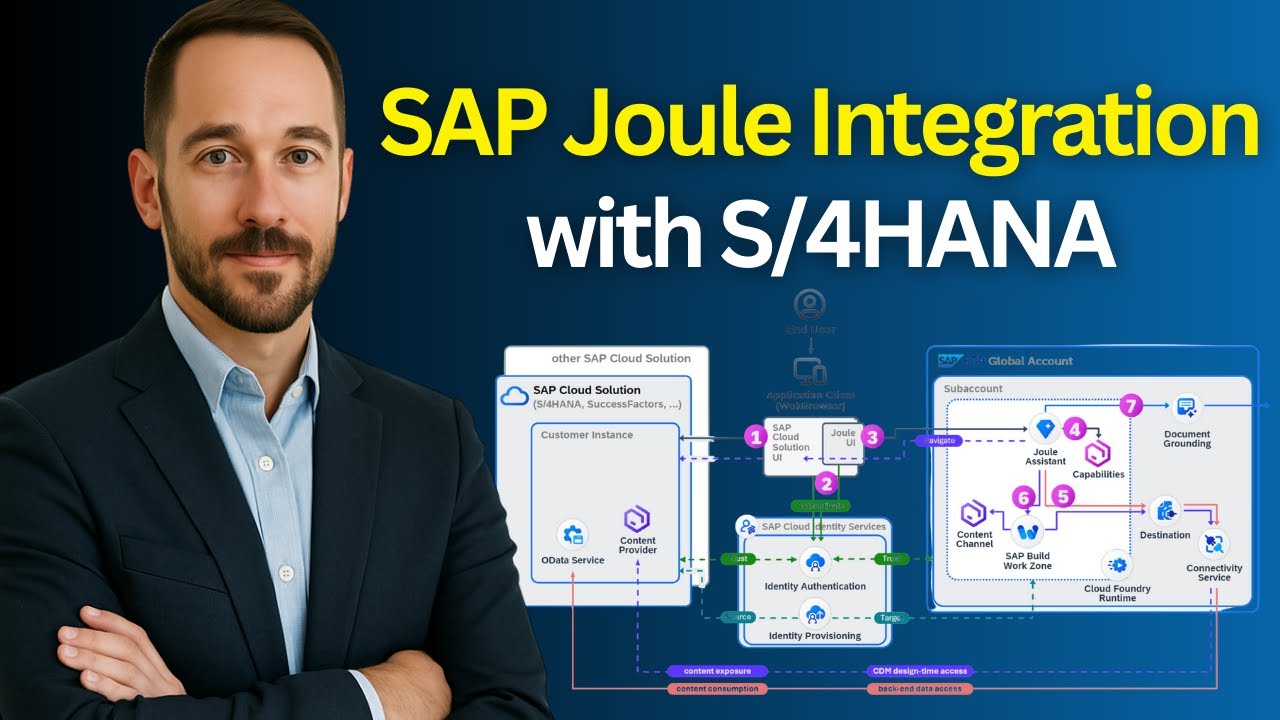
SAP Joule Architecture: Key Components Explained
Four systems sit at the center of SAP Joule integration with S/4HANA. Each plays a distinct, irreplaceable role:
| System | Role in the Integration |
|---|---|
| SAP S/4HANA | Your business brain â transactions, data, and processes. |
| SAP Joule | The AI assistant â conversational and context-aware, running on BTP. |
| SAP Build Work Zone | The interaction layer â navigation engine, role manager, and content aggregator. |
| Cloud Identity Services | The trust authority â knows who every user is across every system. |
The critical insight: none of these systems automatically trust each other. None of them share context by default. The entire integration exists to create that trust, alignment, and shared understanding â deliberately, layer by layer.
How SAP Joule Works: End-to-End Flow Explained
To understand why this integration is complex, trace what happens when a user types âShow me overdue invoicesâ into Joule:
- Joule receives the natural language question.
- It checks the userâs identity via SAP Cloud Identity Authentication.
- It validates their roles and data access permissions.
- It determines which SAP system holds the relevant data.
- It navigates through Work Zone and Fiori app content.
- It fetches the data from S/4HANA through configured endpoints.
- It returns a context-aware, role-appropriate response.
Every step in that chain only works if the integration has been correctly configured. A break at any point means silence â or worse, incorrect output.
SAP Joule Integration Steps with S/4HANA (High Level)
Letâs walk through this like a real implementation journey.

1. Configure Trust to the Identity Authentication Tenant
Everything starts with identity.
Joule depends on SAP Cloud Identity Services to understand:
- Who the user is
- What roles they have
- What data they are allowed to access
This step establishes trust between your SAP BTP subaccount and the Identity Authentication tenant.
Critical requirement:
Every user must exist consistently across all systems with the same Global User ID.
Also remember:
SAP Joule is provisioned on SAP BTP, so your global account, subaccount, and required entitlements must already be in place before starting.
2. Configure Trusted Domain in SAP BTP
Once identity trust is established, systems still donât communicate freely.
You must explicitly allow communication by configuring trusted domains in SAP BTP.
This ensures:
- Secure cross-system interaction
- Controlled exposure of endpoints
Important:
This is communication-level trust, not identity trust.
3. Configure User Attributes for Joule from the Identity Directory
Identity alone is not enough.
Joule needs context.
You must map:
- First name / Last name
- Groups
- Global User ID (user_uuid)
This is what allows Joule to provide relevant, role-based answers instead of generic responses.
4. Configure Trusted Domains in Identity Authentication
Now you complete the communication layer from the IAS side.
In the Identity Authentication tenant:
- Add trusted domains
- Allow cross-origin communication
Without this:
Systems will block each other-even if identity is configured correctly.
5. Expose SAP Fiori Launchpad Content to SAP BTP
Now we move to content.
Using transaction /UI2/CDM3_EXP_SCOPE, you expose:
- Business roles
- Catalogs
- Spaces / Pages
This step makes your SAP content visible outside S/4, so it can be consumed by other services.
6. Set Up SAP S/4HANA Cloud Private Edition as a Content Provider
This is where S/4 starts âtalkingâ to the outside world.
Using SAP Cloud Connector, you:
- Define system mappings
- Enable principal propagation
- Expose UI, OData, and content services
Important insight:
Only selected resources are exposed â because these endpoints become internet-accessible.
7. SAP Build Work Zone and SAP Start
This is one of the most misunderstood parts.
SAP Build Work Zone is not just a UI layer.
It acts as:
- Navigation engine
- Content aggregator
- Role-based access controller
Joule depends on Work Zone to understand:
- Where applications are
- How to navigate
- What the user can access
Integrate SAP Joule with SAP Build Work Zone and SAP Start by enabling seamless navigation and role-based access to business applications.
Note:Â Many consultants underestimate Work Zoneâs architectural role in this integration. It is not optional.
8. Run the Joule Booster
Now comes orchestration.
The Joule Booster:
- Connects all systems
- Creates the Joule Formation
- Applies initial configurations
Think of it as the step where everything you configured starts working together.
9. Configure Destinations
Now you wire everything together.
Destinations define:
- System endpoints
- Authentication methods (OAuth / SAML)
- Communication paths
This is the integration backbone.
For example:
- Work Zone uses destinations to fetch content from S/4
- Joule uses these connections to interact with backend systems
10. Configure Identity Provisioning Service
Now you synchronize users and roles.
Using IPS, you:
- Sync users from S/4 to Work Zone
- Map roles and groups
- Apply transformations
This ensures:
Joule responses are always role-aware and secure.
11. Configure and Activate Joule Plug-In in a Target Mapping
Finally, Joule becomes visible.
You:
- Create a target mapping (
Shell-plugin) - Assign roles and catalogs
- Activate the plugin
And just like thatâŚ
Joule appears inside SAP
Users can interact using natural language
Why SAP Joule Matters for SAP Consultants and Architects
Before starting any Joule implementation, these constraints deserve attention â each one has derailed real projects:
- Joule is BTP-native â it cannot exist without a properly configured BTP environment.
- One Joule instance maps to exactly one Work Zone instance.
- Identity must be unified across all connected systems â without exception.
- Integration is centrally managed through the Joule Formation construct.
- Mixing deployment types (e.g., Public Cloud + Private Cloud S/4) is not supported.
Understanding the constraints upfront is as valuable as understanding the steps themselves.